If you’ve ever looked into getting a tumbler printer for your small business, side hustle, or even just personal use, you’ve probably noticed there are way more options out there than you might think. As someone who’s been in the tumbler printer supplier game for a few years, I’ve talked to dozens of folks who get overwhelmed trying to pick one based on ease of use alone. It’s not just about whether a printer prints a good design—if it takes three hours to set up and requires a degree in tech to troubleshoot, it’s not worth it, period. Let’s break down the most common types, how they stack up for someone who’s not a professional printer tech, and what to actually look for when you’re test-driving options (no weird jargon, promise). Tumbler Printer
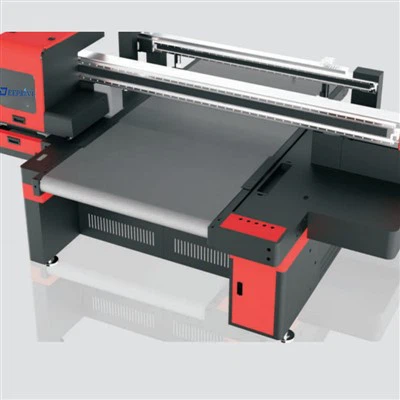
First, let’s get one thing straight: ease of use here isn’t just “turn it on and go.” It covers everything from unboxing to loading designs, swapping materials, fixing small issues, and even troubleshooting when something goes sideways. I’ve seen new users bail on their whole venture because a printer refused to align properly at 8 PM, right before a big order for a local café. That’s the stuff that matters.
Let’s start with the entry-level desktop tumbler printers—these are the ones you’ll see most often on Amazon or Etsy targeted at small creators. Most of these are designed for beginners, right? Wait, not all of them. I’ve had customers come to me frustrated because their entry-level printer required them to manually calibrate the roller every time they switched between 20oz tumblers and 12oz skinny ones. That’s a huge pain point if you’re doing a bunch of custom orders. But the better entry-level models? The ones we see consistently get 4+ star reviews for ease of use? They auto-calibrate for tumbler sizes. You just select the size on the touchscreen, load the tumbler, hit print, and that’s it. No math, no guessing. The design process here is also way simpler than it used to be. A lot of these printers pair with free, user-friendly software—nothing like Adobe Illustrator, I promise. You can drag and drop designs, add text, change colors, even upload your own photos without any weird hoops. The catch here? They’re small, so they’re not for high-volume runs. If you’re only doing 10-15 tumblers a day, entry-level desktop is a no-brainer for ease of use. But if you’re scaling, they’ll start to test your patience fast.
Next up: mid-range commercial tumbler printers. These are the ones we sell a lot of to small print shops or people who are doing 50+ tumblers a day. When I first started, I thought mid-range would be a step up in complexity, but honestly, the best ones balance power and ease of use way better than people expect. Let’s be real—commercial printers have to handle more, so some extra steps are unavoidable, but the good ones cut out the fluff. For example, loading the tumbler: a lot of mid-range models have quick-release rollers, so you don’t have to fumble with tiny clamps every time. The software here is a bit more robust, but it still integrates with common tools like Canva, which most of our customers already use. That’s a game-changer—no more converting files to weird formats just to get them to print. The one thing that sets mid-range apart from entry-level is that they handle different surface types easier. If you’re printing on matte tumblers, glitter tumblers, or even stainless steel bottles, the color calibration tool is automatic. You don’t have to adjust heat or ink settings manually—just select the material on the screen, and it does the rest. The only downside I hear from new mid-range users? If you’re used to super basic entry-level models, the touchscreen is a little more feature-heavy, so it takes an hour or two to get the hang of. But once you do, it’s way less work than fighting with a slow, outdated entry-level printer when your orders pick up.
Then there’s industrial tumbler printers. These are the big ones—for people doing 100+ tumblers a day, or even full production runs. Now, let’s be clear: “ease of use” here is a relative term. Industrial printers aren’t for beginners. They’re built for speed and volume, so they have more moving parts and require regular maintenance. That said, the latest industrial models are way easier to use than they were even three years ago. The big improvement here is remote monitoring. You can check ink levels, track print progress, and even fix small issues (like a misaligned tumbler) from your phone or office computer. No more hovering by the printer all day. The loading process is automated for most models—you can set up a stack of tumblers, and the printer feeds them one by one. That’s huge for someone who’s doing back-to-back orders. The catch? If you’re not comfortable with basic tech or troubleshooting, you’ll want someone on your team who is. Industrial printers can have hiccups, but the good ones have step-by-step error guides right on the touchscreen, so you don’t need a tech on speed dial. I always tell potential industrial buyers: if you’re just starting out, skip this. But if you’re scaling fast and need the volume, it’s worth the minor learning curve for the time it saves you.
Wait, there’s another category I almost forgot: rotary press tumbler printers, which are different from the standard inkjet or laser tumbler printers most people use. These are the ones that use a heat press to transfer designs, right? A lot of beginners get confused between rotary press and direct-to-tumbler printers. Let’s talk ease of use here. Rotary press printers are way simpler upfront, to be honest. They use pre-cut heat transfer vinyl, so you don’t have to deal with ink cartridges or calibration. You cut your design, weed it (remove the excess vinyl), then press it on. The problem? That manual process scales like garbage. If you’re doing 100 tumblers, cutting and weeding each one takes forever. I’ve had customers switch from rotary press to our mid-range tumbler printers because they were working 12 hours a day just to keep up with orders. So if you’re only doing small, personal orders or local craft fair runs, rotary press is super easy. But if you want to grow, direct-to-tumbler printers are way easier to handle long-term, even if the initial setup is a bit more.
Now, let’s talk about the stuff that makes or breaks ease of use, no matter which type you pick. This is the part most comparison lists skip, but I see it every day. First, customer support. I don’t care how “easy” a printer is—if it breaks at 9 PM before a deadline, and the company’s support line is closed until Monday, that’s a nightmare. The printers we stand by have 24/7 chat support and free video tutorials for every single feature. A lot of budget printers skimp on support, so you’re left Googling random forums when something goes wrong. Second, replacement parts. Ink cartridges, rollers, small alignment pieces—if those are hard to find or super expensive, that adds a ton of hassle. The good printers use standard, affordable parts, so you can pick a new ink cartridge up at a local office supply store if you need to, not wait a week for shipping. Third, software updates. Nothing is more annoying than a printer that randomly stops working because of a software update, and the company doesn’t release a fix for six months. The printers we sell push updates automatically, so you don’t have to remember to do it, and they never break mid-order.
Let’s also address the biggest myth out there: more expensive = less easy to use. That’s not true at all. I’ve seen budget entry-level printers that are a pain to use, and mid-range printers that are actually simpler than some cheap ones. It’s about matching the printer to your needs, not just the price tag. For example, if you’re a hobbyist who does 5 tumblers a week, a $300 entry-level printer that’s easy to use is way better than a $1,500 industrial printer that you’ll never need to use to capacity. Conversely, if you’re doing 50 tumblers a day, a $300 printer will become your worst enemy fast—you’ll spend more time troubleshooting than making money.

I get it, choosing a tumbler printer is a big deal. You’re investing time and money, and you don’t want to pick something that’ll hold you back. At the end of the day, ease of use boils down to how much time you want to spend on setup, troubleshooting, and manual work, versus how much you want to focus on making great products and growing your business. If you’re still not sure which type fits your workflow, we’re here to help—we don’t do pushy sales, and we’ll walk you through your options based on exactly what you need, no fluff. If you’re ready to test a printer, ask questions, or get a custom quote for your order volume, reach out to our team to start the conversation. We’re happy to help you find the right fit, no matter where you’re at.
UV Inkjet Flatbed Printing Machine References:
- Small Business Administration. (2023). Guide to Selecting Business Equipment for Creative Industries. U.S. Small Business Administration.
- Printwear & Promotion Today. (2022). Ease of Use Metrics for Digital Printing Equipment in Small Shops. Intermedia Publishing Group.
- Consumer Reports. (2023). 2023 Guide to Specialty Printing for Beginners. Consumer Reports National Research Center.
- Ink Jet Technology Association. (2022). Direct-to-Surface Printing Usability Analysis for Small Businesses. Ink Jet Tech Association.
- Etsy Seller Handbook. (2023). Scaling Your Custom Tumbler Business: Equipment and Workflow Tips. Etsy Inc.
Shenzhen Deeprint Technology Co., Ltd.
As one of the most professional tumbler printer manufacturers and suppliers in China, we’re featured by quality products and good service. Please rest assured to buy customized tumbler printer made in China here from our factory. Contact us for free sample.
Address: 6-1, Huangwu Road, Tongle Community, Baolong Street, Longgang District, Shenzhen City 518100,China.
E-mail: ellen@uvdprint.com
WebSite: https://www.uvd-print.com/
